A site that did its job
Nicole runs Limitless HR Solutions from Forest Lake in Brisbane. She helps independent retailers and small businesses with HR advice, recruitment, training and workplace health and safety.
I built her original website on WordPress, on a paid host. Nine pages, with her copy written and live. The rebuild kept the same nine pages and moved them to a lighter setup.
I built a first preview of the rebuild. That's how I start every job: you see the site first. I ended up making three versions, and she picked one. Her site is live at limitlesshr.com.au.
Decision one: keep every word
A rebuild is the easy moment to rewrite everything. I didn't. Her copy was already hers, and changing it would have meant changing how she describes her business. That wasn't the job.
I copied the text from her live pages and built around it, then checked the new pages against the old ones word by word. Apart from small tidy-ups to the contact details and the About page, and her email address now sitting on her own domain, every word is hers.
Her logo set the look
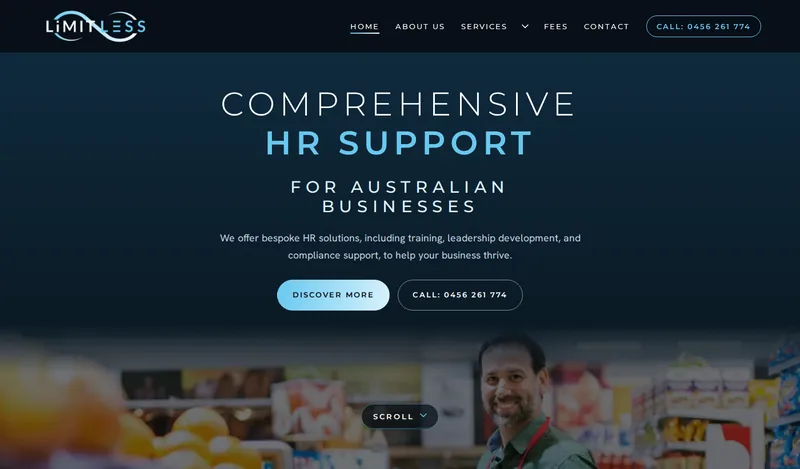
The navy and the sky blue come straight from her logo, and so does the shape that runs through the site. Her logo is an infinity loop. On the new pages it's a thin line with a small dot running round it, and it sits between sections where the page changes subject. The photo at the top stays clear of it.
It's decoration, so the page reads the same without it. If a visitor has animation switched off on their phone, the dot stays still.

The first screen on a phone
My first version put a headline and two buttons on the first screen and the photo below it. Someone who doesn't scroll would never have seen it. I moved the photo up so it shows without scrolling, and added a small Scroll button over it to say there's more underneath.
Call sits in the header and under the headline. The Services menu opens to all four services, each with a photo and the short summary from her own pages.

The enquiry form
When someone fills in the enquiry form, it's emailed to Nicole, and she can reply straight from her inbox. There's a spam check behind it so junk doesn't reach her. I tested it on launch day from my phone, and the email arrived.
What she ended up with
In plain terms:
- Nine pages, with her words on every one.
- A home page that opens quickly on a phone. I tested it myself on launch day.
- Call buttons in the header and under the headline, and an enquiry form that goes straight to her inbox.
- Her email working all the way through the move.
- Her old photo library backed up, all 84 files.
Moving the domain without breaking her email
Her email runs on Microsoft 365, separate from the website. The risk when you move a domain is that the settings that make email work get lost on the way. So before anything switched, I made sure every one was in place on the new setup, and I checked them again afterwards. I didn't touch her email setup.
One thing went wrong. Her old host still had a claim on the domain, and that claim beat the new setup. For more than an hour, visitors could still see the old site, and for a few minutes some pages showed a mix of old and new. It cleared once the old host let go of the domain. Next time, I'll ask the old host to release the domain before I change anything.
What I left out
No rewriting to chase Google. The words on the pages are the ones she already had.
No new claims. If it wasn't on her old site, it isn't on the new one. No blog, no shop, no booking system, because that wasn't the job.
And no results yet. The site went live on 5 November, so I can't tell you it brings in more enquiries. When there's something real to report, I'll add it here.
If you already have a WordPress site
Three questions apply to any site like this:
- What's already approved? Keep those words.
- What must keep working? Your email and your domain.
- What would be a guess? Leave it off until it's real.
If your site works but you'd like it lighter, quicker on a phone or easier to hand over, put the address in my form and I'll tell you what I'd keep and what I'd change. A rebuild like this one is a bigger job than the homepage I usually start with, and I'll say so up front.